自动部署及管控 / 开机脚本相关命令-简智魔方
文整理常用的开机脚本命令,您可以将以下命令粘贴到操作系统开机脚本中,系统将会自动执行。
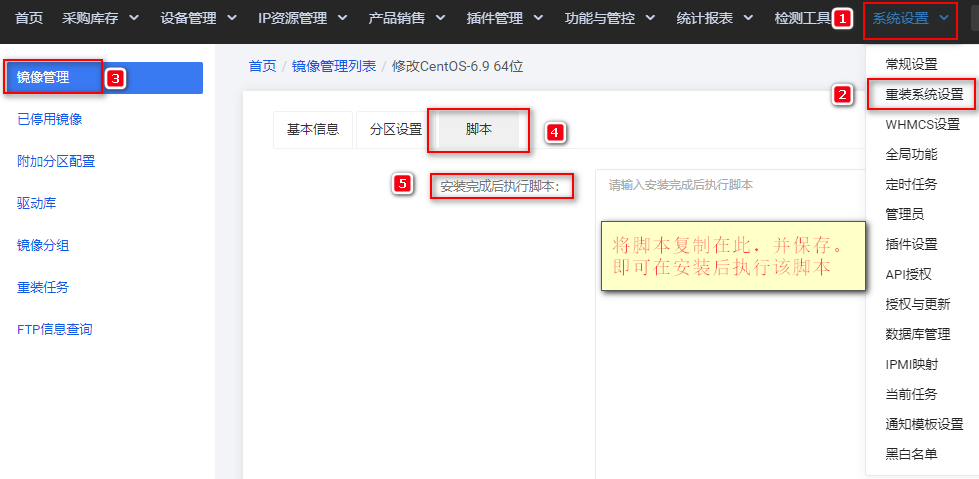
在【系统设置】-【重装系统设置】-【镜像管理列表】中,选定操作系统【点击修改】,在脚本栏中将以下命令复制,则安装系统后将会自动执行。
# 端口可以是 单个如 80 或者连续多个 9000-10000
netsh advfirewall firewall add rule name={项目名称} protocol=TCP localport={端口} dir=in action=allow
# 关闭防火墙
netsh Advfirewall set allprofiles state off
# 开启远程桌面连接 参数 0为开 1为关
reg add "HKEY_LOCAL_MACHINE\SYSTEM\CurrentControlSet\Control\Terminal Server" /v fDenyTSConnections /t REG_DWORD /d 0 /f
# 修改远程连接端口
reg add "HKEY_LOCAL_MACHINE\SYSTEM\CurrentControlSet\Control\Terminal Server\Wds\rdpwd\Tds\tcp" /v "PortNumber" /t REG_DWORD /d "{端口}" /f
reg add "HKEY_LOCAL_MACHINE\SYSTEM\CurrentControlSet\Control\Terminal Server\WinStations\RDP-Tcp" /v "PortNumber" /t REG_DWORD /d "{端口}" /f
# 远程桌面安全验证
0 为允许任何链接 1为仅允许安全的连接
reg add "HKEY_LOCAL_MACHINE\SYSTEM\CurrentControlSet\Control\Terminal Server\WinStations\RDP-Tcp" /v "UserAuthentication" /t REG_DWORD /d "0" /f
# 允许ICMP ping
netsh advfirewall firewall add rule name=icmp4 protocol=icmpv4 dir=in action=allow
netsh advfirewall firewall add rule name=icmp6 protocol=icmpv6 dir=in action=allow